
Week 3 - Understanding Data: Extra-2 - BMP File Structure Investigation
Learning Objectives
- Investigate the structure of BMP files.
- Analyse an image file structure through a Hex Editor.
Employability Skill Objectives
- Use a Hex Editor tool such as HxD to investigate file structure.
Introduction
The purpose of this lab is to familiarise students with the concept of data structure and how data is laid out and stored in computers.
A data structure is divided into fields, and each field has a name and a defined size.
For example, in a BMP file structure, the first field provides the file signature and has a length of 2 bytes.
In this lab, students will analyse a BMP image to extract information such as image size, height, width, and related metadata.
Cyber Lab Shared Folder All required files are available in the CyberLab shared folder.
- Open File Explorer.
- In the address bar, type
\\cyberlaband press Enter. - If prompted for login details, use:
Username: student
Password: Student4 - Navigate to Cyber Share , then Digital Forensics – Ali Jaddoa Folder.
Setup
You will need a Hex Editor such as:
- Login to you PC, username:Student, password student2
- in case you need admin permmission, please let me know.
- You can use eitherof the follwing
- HxD Hex Editor (desktop version), and it should be alreadu intalled on your pc.
- HexEd.it (online version).
Task 1 - Study Basic BMP Data Structure
The bitmap file structure consists of three core sections:
- BITMAPFILEHEADER
- BITMAPINFOHEADER
- BITMAPDATA
Table 1 details the structure of each section and defines the offset, size and description of data fields. All integer values are stored in little-endian format.
Table 1: BMP File Structure Example
| Offset | Size | Description | Hex Value | Value |
|---|---|---|---|---|
| BITMAPFILEHEADER | ||||
| 0h | 2 | File Signature (unsigned integer 66, 77) | 42 4D | "BM" |
| 2h | 4 | Size of the BMP file | F6 00 00 00 | 246 bytes |
| 6h | 2 | Unused | 00 00 | |
| 8h | 2 | Unused | 00 00 | |
| Ah | 4 | Offset where the pixel array (bitmap data) starts | 36 00 00 00 | 54 bytes |
| BITMAPFILEINFO (DIB Header) | ||||
| Eh | 4 | Number of bytes in the DIB header | 28 00 00 00 | 40 bytes |
| 12h | 4 | Width of the bitmap in pixels | 02 00 00 00 | 2 pixels |
| 16h | 4 | Height of the bitmap in pixels | 02 00 00 00 | 2 pixels |
| 1Ah | 2 | Number of colour planes being used | 01 00 | 1 plane |
| 1Ch | 2 | Number of bits per pixel | ||
| 1Eh | 4 | BI_RGB, no pixel array compression used | 00 00 00 00 | 0 |
| 22h | 4 | Size of raw data in the pixel array (including padding) | 10 00 00 00 | 16 bytes |
| 26h | 4 | Horizontal resolution of the image | ||
| 2Ah | 4 | Vertical resolution of the image | ||
| 2Eh | 4 | Number of colours in the palette | 00 00 00 00 | 0 colours |
| 32h | 4 | Important colours | 00 00 00 00 | 0 (all important) |
Sources:
Steps
-
Use this file
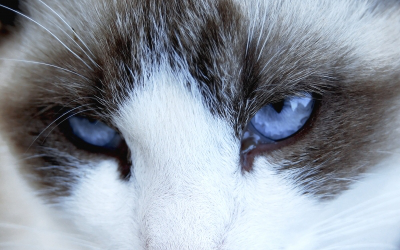
cat.bmpthat- you can download from here,
- Or from Moodle-Week 3
- Or from the Shared Folder in your local machine.
-
From Moodle → Week 3 → Lab 2 Lab-2 BMP File Structure, download cat.bmp and save it to your folder. or you can download from here
-
Open HxD Hex Editor
-
Open
cat.bmpin the Hex Editor. -
Use the above table to answer the following questions:
| Question | Answer |
|---|---|
| 1. What is the file signature (“magic number”) of the image? | |
| 2. What is the total size of the image? | |
| 3. What is the width of the image (in pixels)? | |
| 4. What is the height of the image (in pixels)? | |
5. What is the hexadecimal value of the four bytes at offset 0x26? Is this in little-endian format? | |
| 6. What is the value of the horizontal resolution (pixels/meter)? | |
| 7. What is the value of the vertical resolution (pixels/meter)? |
Task 2 - Answer the Following Questions
-
If a
.bmpfile is opened in a hex editor (using the Windows BITMAPINFOHEADER format), at what offsets (in hex) can the width and height of the image be found? -
Consider the following hex values (first 36 bytes from a bitmap file):
42 4D 16 94 04 00 00 00 00 00 36 00 00 00 28 00 00 0090 01 00 00 FA 00 00 00 01 00 18 00 00 00 00 00 E0 9304 00 13 0B 00 00 13 0B 00 00 00 00 00 00 00 00 00 00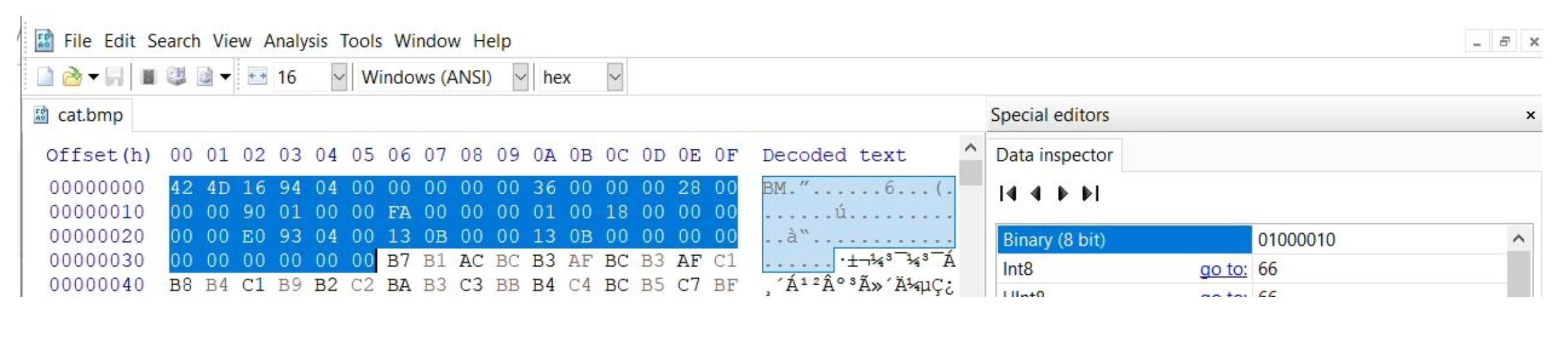
- Assuming that the file uses the Windows
BITMAPINFOHEADERformat, what is the hexadecimal value at offset12h(size: one byte) ?
- Assuming that the file uses the Windows
-
Using the same data above:
- At offset
0h, what is the file signature (2 bytes) for a BMP image?
- At offset
-
The digital world (data, structures, and information) is constructed of binary.
- How many symbols are used to represent binary?
- How many states can the symbols represent?
-
The digital world is also represented in hexadecimal.
- How many symbols are used to represent hexadecimal?
- How many binary digits are used to represent each hexadecimal symbol?
-
The digital world (data, structures, and information) is also constructed of bytes.
- How many bits are in a byte?
- How many decimal values can be represented with 8 bits?
- What is the maximum decimal value representable using 8 bits (starting count from zero)?
---