Week 11: Email Forensics

Email Forensics (Header Analysis)

Ali Jaddoa

Ali.Jaddoa@Roehampton.ac.uk

Credit to Mastaneh Davis


25/26
Week 11: Email Forensics

Today's

  • Explanation of the importance of email header analysis in cyber
    security and forensic investigations.
  • Overview of the components of an email header and their significance in identifying:
    • sender authenticity,
    • routing information,
    • and potential threats.

25/26
Week 11: Email Forensics

What is Email Forensics?


25/26
Week 11: Email Forensics

What is Email Forensics?

  • The process of investigating and analysing email communication to detect cyber threats, fraud, and malicious activities.

Why is it Important?

  • Identifying phishing attacks and email fraud.
  • Tracing cybercriminal activities.
  • Providing legal evidence in digital investigations.

25/26
Week 11: Email Forensics

Email Architecture

  • Headers: Metadata about the sender, recipient, and email path.
  • Body: The main content, including text and embedded links.
  • Attachments: Files sent within the email, potentially containing malware.

25/26
Week 11: Email Forensics

Email Transmission Protocols

  • SMTP (Simple Mail Transfer Protocol) Sending emails.
  • POP3 (Post Office Protocol v3) Receiving emails, stores locally.
  • IMAP (Internet Message Access Protocol) Receiving emails, stores on the server.

25/26
Week 11: Email Forensics

1. SMTP (Simple Mail Transfer Protocol) - Sending Emails

  • For sending emails from a client to a mail server or between mail servers.
  • Does not store emails but ensures delivery to the recipient’s mail server.
  • Works on:
    • Port 25 (default, often blocked by ISPs)
      • used only for server-to-server relay
    • Port 587 (secure submission)
    • Port 465 (deprecated SSL - OUTDATED)

25/26
Week 11: Email Forensics

2. POP3 (Post Office Protocol v3) - Receiving Emails (Stores Locally)

  • Used by email clients to retrieve emails from a mail server.
  • Downloads emails to the local device and usually removes them from the server.
  • Works on:
    • Port 110 (unencrypted)
    • Port 995 (SSL/TLS)

Best for single-device email access: emails are not accessible from other devices.

If the device is lost or damaged, the emails are lost unless they were backed up.


25/26
Week 11: Email Forensics

3. IMAP (Internet Message Access Protocol) - Receiving Emails (Stores on Server)

  • Allows email clients to access emails stored on the mail server without downloading them.
  • Syncs emails across multiple devices.
    • Changes made to emails (e.g., deleting, marking as read) on one device are reflected on all other devices.
  • Works on:
    • Port 143 (unencrypted)
    • Port 993 (SSL/TLS)

Ideal for accessing emails from multiple devices while keeping them available on the server.


25/26
Week 11: Email Forensics

How email works?

MUA (Mail User Agent) Email client for sending/receiving mail Outlook, Gmail, Thunderbird
MTA (Mail Transfer Agent) Routes emails to their destinations Exchange, Sendmail, Postfix, etc
SPF (Sender Policy Framework) Prevents sender address forgery via DNS records
DKIM (DomainKeys Identified Mail) Ensures email authenticity using cryptographic signatures

25/26
Week 11: Email Forensics

Activity: Take 5 mins

What is the role of Email Header Analysis in Cyber Security


25/26
Week 11: Email Forensics

Why bother

  • Analysing email headers is one of the most common tasks in digital forensics
  • Establishing the identity of the email sender and receiver.
  • Examining the authentication keys to identify if an email was forged.
  • Investigating email-related crimes, such as phishing, fraud and harassment.

25/26
Week 11: Email Forensics

Understanding Email Headers

  • Provide routing information about the email.

  • Essential for tracing email origins and detecting spoofing.

  • Key Fields to Analyse:

    • From: - Sender’s email address (can be spoofed).
    • To: - Recipient’s email.
    • Received: - Logs email transfer between servers.
    • Message-ID: - Unique identifier for tracking emails.
    • Return-Path: - Address to which non-deliverable mail is returned.

25/26
Week 11: Email Forensics

Understanding Email Headers: Example-2

width:1OO% center


25/26
Week 11: Email Forensics

Understanding Email Headers: Example-2

width:1OO% center


25/26
Week 11: Email Forensics

Understanding Email Headers: Example-2 Cont'

Field Purpose Example Value
Return-Path Actual sender address <sender@example.com>
Received Email relay path Received: from mail.example.com...
SPF Check Verifies sender IP spf=pass (domain designates 192.168.1.100 as permitted sender)
Authentication-Results Shows SPF, DKIM, DMARC checks spf=pass; dkim=pass; dmarc=pass
DKIM-Signature Validates message integrity DKIM-Signature: v=1; a=rsa-sha256; d=example.com;
Message-ID Unique email identifier <abc123xyz@mail.example.com>
From Sender name & email "Example Sender" <sender@example.com>
To Recipient email <recipient@gmail.com>
Subject Email subject Test Email
Date Email sent timestamp Mon, 11 Mar 2024 06:49:56 -0700

25/26
Week 11: Email Forensics

Email Authentication Protocols

width:1OO% center


25/26
Week 11: Email Forensics

1. Sender Policy Framework (SPF)

  • An email authentication protocol that helps prevent email spoofing.
  • Allows domain owners to specify authorised IP addresses for sending emails: allowlist.
  • Key Benefits:
    • Prevents sender address forgery.
    • Mitigates phishing attacks.
    • Reduces fake sender email addresses.
  • Limitations
    • SPF does not confirm email legitimacy, only verifies the sending server.
    • SPF breaks when emails are forwarded.

25/26
Week 11: Email Forensics

1.1 How SPF Works

width:1OO% center


25/26
Week 11: Email Forensics

2. Domain Keys Identified Mail (DKIM)

A method used to associate a domain name with an email using cryptography.

  • Ensures emails are not tampered with in transit.
  • Verifies the true ownership of the message.
  • Uses public and private keys

25/26
Week 11: Email Forensics

2.1 How DKIM Works

  • The sender's email server adds a cryptographic signature to the email header.
  • The receiving mail server checks this signature against the public key in the sender’s DNS records.
  • If the signature matches, the email is verified as legitimate.

25/26
Week 11: Email Forensics

Example DKIM Signature in an Email Header

DKIM-Signature: v=1; a=rsa-sha256; d=example.com; s=selector1; bh=Y1JvGmW6p0+...3X5rQ==; b=E1yIb2...N1KfQ==
  • d=example.com: Domain that signed the email.

  • s=selector1: Selector used to locate the DKIM key in DNS.

  • bh=Y1JvGmW6... : Hash of the email body.

  • b=E1yIb2... : Cryptographic signature of the email.

  • Why DKIM Matters:

    • Prevents email tampering
    • Helps detect spoofed emails
    • Improves email security & trust

25/26
Week 11: Email Forensics

3. Domain-based Message Authentication, Reporting, and Conformance (DMARC)

Checks for misalignment between the sender’s domain and the "From" field.

  • Ensures the domain used in SPF/DKIM matches the displayed sender domain.

  • What is Misalignment?

    • Occurs when the authenticated domain (SPF/DKIM) differs from the domain in the "From" field.

25/26
Week 11: Email Forensics

3.1 How DMARC Works

width:1OO% center


25/26
Week 11: Email Forensics

Example of DMARC

Scenario Description
Claimed Sender The email claims to be from "example.com".
SPF Check Sent from a server not authorised by example.com (SPF fails).
DKIM Check No valid DKIM signature from example.com.
DMARC Action DMARC detects misalignment and flags the email as suspicious.

Why DMARC Matters?

  • Prevents email spoofing
  • Enhances email security
  • Protects against phishing attacks

25/26
Week 11: Email Forensics

Example SPF, DKIM, DMARC

Received Shows email relay path Received: by 2002:ab3:7c99:0...
SPF Sender IP verification spf=pass (209.85.220.41 is authorised)
DKIM Email integrity check DKIM-Signature: v=1; a=rsa-sha256; d=gmail.com;
DMARC Domain authentication dmarc=pass (p=NONE sp=QUARANTINE)
Return-Path Actual sender address <modhomestay@gmail.com>

25/26
Week 11: Email Forensics

SPF, DKIM & DMARC Overview

DKIM Missing? If DKIM is missing, it means the sender is not using DKIM, but it doesn’t necessarily indicate malicious intent.
No DKIM + No SPF = No DMARC Without both DKIM and SPF, DMARC validation cannot occur.
DMARC An additional security layer that leverages SPF and DKIM to verify email senders.
DMARC Benefits - Allows domain owners to define policies for handling unauthenticated emails.
- Helps protect against phishing, spoofing, and email fraud.
- Provides reporting and monitoring of authentication failures.

25/26
Week 11: Email Forensics

Investigating Email Headers

Tracing an Email

  1. Identify the originating IP address.
  2. Analyse the Received: fields for email path.
  3. Cross-check SPF, DKIM, and DMARC records to verify authenticity.

Tools for Header Analysis


25/26
Week 11: Email Forensics

Detecting Email Spoofing

Common Spoofing Techniques

  • Display Name Spoofing: Attacker changes the sender name.
  • Lookalike Domains: Using similar-looking domains (e.g., g00gle.com).
  • Reply-to Address Manipulation: Mismatch between From: and Reply-To:.

Verifying Authenticity

  • Check SPF, DKIM, DMARC.
  • Compare Return-Path: and From: addresses.
  • Analyse message headers for anomalies.

25/26
Week 11: Email Forensics

Recap: Email Header Analysis

  • Check email components (headers, authentication fields).
  • Review the "Received" field (trace email path).
  • Verify "Reply-To" (ensure it matches the sender).
  • Compare "Message-ID" & "From" fields (detect spoofing).
  • SPF Alignment: PASS if Return-Path matches From domain.
  • SPF Authentication: FAIL if sender's IP is not authorised.
  • DKIM Alignment: Compare DKIM signature with From field.
  • DKIM Authentication: Verify if DKIM signature is valid.

25/26
Week 11: Email Forensics

Email Forensic Tools: Popular Tools

  • ExifTool - Extract metadata from email files.
  • MailXaminer - Comprehensive email forensic analysis.
  • Xplico - Packet capture and email analysis.
  • Wireshark - Analysing SMTP traffic.

25/26
Week 11: Email Forensics

Lab


25/26

- Key role in cybersecurity, digital investigations, and incident response.

--- ## Email Transmission Protocols ![width:1OO% height:550px center](../../figures/How_SMTP_works%20_copy.png)
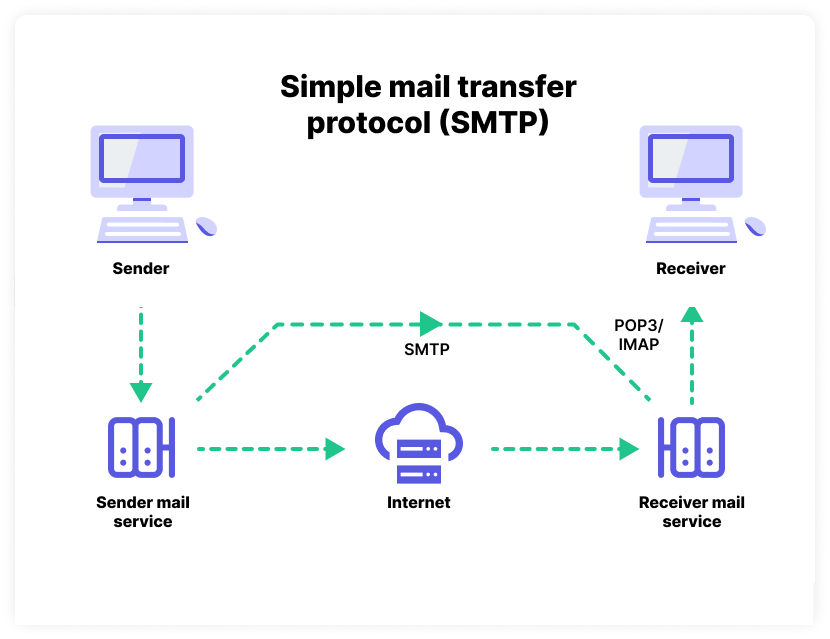
- **MUA (Mail User Agent)** (e.g., Outlook). - **MTA (Mail Transfer Agent)** Routes emails to their destinations (e.g., Exchange, Sendmail). - **SPF (Sender Policy Framework)** Prevents sender address forgery via DNS records. - **DKIM (DomainKeys Identified Mail)** Ensures email authenticity using cryptographic signatures.

- `Message-ID`

- Research the anatomy of an email header and list the most common elements that are useful in the case of a phishing attack. - Select an email that you received recently - Find its email header and manually analyse it - Analyse the email header using MX Lookup https://mxtoolbox.com/ - Investigate location of server by using its IP address. - IP locator such as https://www.ip2location.com