
Week-12 - Network Forensics Lab 1: Attack Investigattion
Aim
Investigate network traffic to identify and analyse a SYN flood attack. You will learn to recognise attack signatures, understand TCP handshake exploitation, and extract forensic evidence from packet captures.
Learning Objectives
- Understand the TCP three-way handshake and how it can be exploited
- Identify SYN flood attack patterns in network traffic
- Use Wireshark filters to isolate attack traffic
- Analyse attack intensity using I/O graphs
- Document findings for forensic reporting
Resources Needed
- Wireshark
- Lab file
SYN_Flooding.pcapng: You can find the file in you Cyberlab or you can download from here.
Background
TCP Three-Way Handshake
Before data can be exchanged over TCP, a connection must be established using a three-way handshake:
| Step | Packet | Description |
|---|---|---|
| 1 | SYN | Client sends SYN with initial sequence number |
| 2 | SYN/ACK | Server acknowledges and sends its own SYN |
| 3 | ACK | Client acknowledges server's SYN |
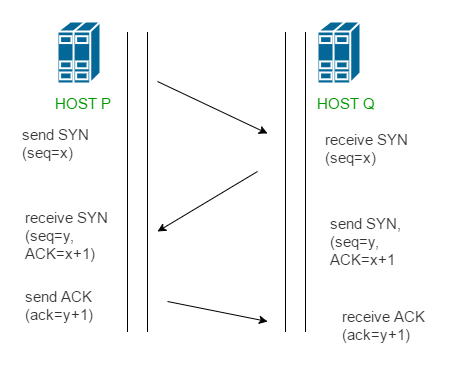
Once complete, the connection is ESTABLISHED and data can flow.
SYN Flood Attack
A SYN flood is a Denial of Service (DoS) attack that exploits the handshake:
- Attacker sends many SYN packets (often with spoofed source ports)
- Server responds with SYN/ACK and allocates resources, waiting for ACK
- Attacker never sends ACK (or sends RST to reset)
- Server's connection table fills up with half-open connections
- Legitimate users cannot connect — service denied
Attack Indicators
- High volume of SYN packets from one source
- Many SYN/ACK responses from victim
- RST packets sent by attacker (refusing to complete handshake)
- No ACK packets completing connections
- Rapidly incrementing source ports
Part A: Initial Analysis
Task 1: Open the Capture
- Open
SYN_Flooding.pcapngin Wireshark - Observe the packet list — note the colours and the Info column
Q1.1: How many packets are in this capture? (Check the status bar)
Your Answer: _______________________________________________
Click to reveal answer
Answer: 440,399 packets
Q1.2: What protocol dominates this capture?
Your Answer: _______________________________________________
Click to reveal answer
Answer: TCP
Task 2: Identify the Parties
- Look at the Source and Destination columns in the first 20 packets
Q2.1: What is the IP address of the **attacker**?
Your Answer: _______________________________________________
Click to reveal answer
Answer: 10.0.0.8
Q2.2: What is the IP address of the **victim**?
Your Answer: _______________________________________________
Click to reveal answer
Answer: 10.0.0.16
Q2.3: What port is being targeted on the victim?
Your Answer: _______________________________________________
Click to reveal answer
Answer: Port 80
Q2.4: What service typically runs on this port?
Your Answer: _______________________________________________
Click to reveal answer
Answer: HTTP (Web server)
Part B: Attack Pattern Analysis
Task 3: Examine the Attack Sequence
- Look at packets 1-20 carefully. Examine the Info column.
Q3.1: What TCP flag is set in packets 1-16?
Your Answer: _______________________________________________
Click to reveal answer
Answer: SYN
Q3.2: What happens at packets 17-20? What flags are set?
Your Answer: _______________________________________________
Click to reveal answer
Answer: SYN, ACK (SYN/ACK) — the victim is responding to the SYN requests
Q3.3: Describe the pattern you observe:
Your Answer: _______________________________________________
Click to reveal answer
Answer: The attacker sends multiple SYN packets, then the victim responds with SYN/ACK packets. The attacker never completes the handshake with an ACK.
- Look at the source ports used by the attacker (10.0.0.8) in the first 16 packets.
Q3.4: What is the source port of packet 1?
Your Answer: _______________________________________________
Click to reveal answer
Answer: 1919
Q3.5: What is the source port of packet 16?
Your Answer: _______________________________________________
Click to reveal answer
Answer: 1934
Q3.6: What pattern do you notice in the source ports?
Your Answer: _______________________________________________
Click to reveal answer
Answer: The source ports increment sequentially (1919, 1920, 1921, etc.) — this is a sign of automated attack tools
Task 4: Filter SYN Packets
- Apply the display filter to show only SYN packets (no ACK flag):
tcp.flags.syn == 1 && tcp.flags.ack == 0
Q4.1: How many SYN-only packets are displayed?
Your Answer: _______________________________________________
Click to reveal answer
Answer: 147,904 packets
- Now filter for SYN/ACK responses from the victim:
tcp.flags.syn == 1 && tcp.flags.ack == 1
Q4.2: How many SYN/ACK packets did the victim send?
Your Answer: _______________________________________________
Click to reveal answer
Answer: 148,448 packets
Q4.3: What does this tell you about the victim's behaviour during the attack?
Your Answer: _______________________________________________
Click to reveal answer
Answer: The victim is responding to almost every SYN packet with a SYN/ACK, consuming resources while waiting for ACK packets that never arrive.
Task 5: Identify RST Packets
- Clear the filter and apply:
tcp.flags.reset == 1
Q5.1: How many RST (reset) packets are there?
Your Answer: _______________________________________________
Click to reveal answer
Answer: 144,045 packets
Q5.2: Who is sending the RST packets — the attacker or the victim?
Your Answer: _______________________________________________
Click to reveal answer
Answer: The attacker (10.0.0.8)
Q5.3: Why does the attacker send RST packets during a SYN flood?
Your Answer: _______________________________________________
Click to reveal answer
Answer: The attacker sends RST packets to reset the half-open connections, freeing up their own resources while keeping the victim's resources exhausted. This allows the attacker to continue flooding without running out of source ports.
Task 6: Check for Completed Connections
- Filter for ACK-only packets (completed handshakes):
tcp.flags == 0x010
Q6.1: How many ACK-only packets are there?
Your Answer: _______________________________________________
Click to reveal answer
Answer: 0 (none)
Q6.2: What does this confirm about the attack?
Your Answer: _______________________________________________
Click to reveal answer
Answer: This confirms it is a SYN flood attack — the attacker never completes any TCP handshakes. All connections remain half-open, exhausting the victim's resources.
Part C: Statistical Analysis
Task 7: View Conversations
- Go to Statistics → Conversations → TCP tab
Q7.1: How many TCP conversations are listed?
Your Answer: _______________________________________________
Click to reveal answer
Answer: Thousands of incomplete conversations (each SYN creates a new "conversation")
Q7.2: What is the pattern in the conversations?
Your Answer: _______________________________________________
Click to reveal answer
Answer: All conversations are between 10.0.0.8 and 10.0.0.16, targeting port 80, with very few packets per conversation (incomplete handshakes)
Task 8: I/O Graph Analysis
- Go to Statistics → I/O Graphs
- The default graph shows packets over time
- Click the "+" button to add a new graph
- Set the display filter to:
tcp.flags.syn == 1 && tcp.flags.ack == 0 - Change the colour to red
- Add another graph with filter:
tcp.flags.reset == 1(make it blue)
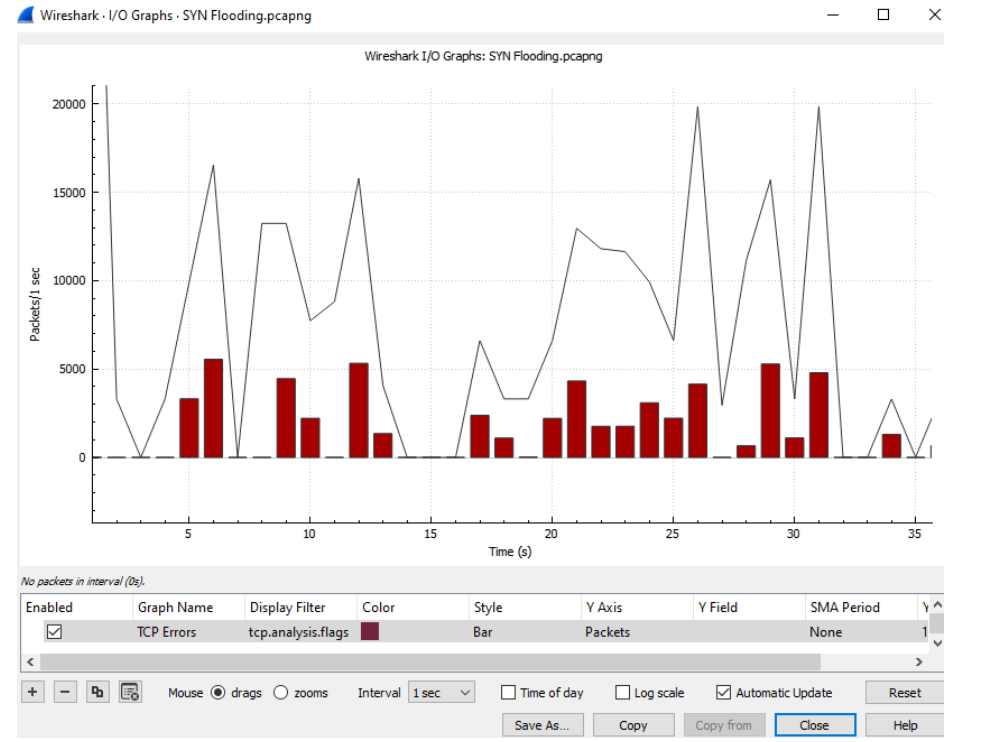
Q8.1: Describe the pattern you see in the graph:
Your Answer: _______________________________________________
Click to reveal answer
Answer: High volume of packets throughout the capture, with SYN packets (red) and RST packets (blue) appearing in waves. The attack maintains consistent intensity over time.
Q8.2: Approximately how many packets per second at the peak?
Your Answer: _______________________________________________
Click to reveal answer
Answer: Approximately 6,000-7,000 packets per second
Q8.3: How long does the attack last (approximately)?
Your Answer: _______________________________________________
Click to reveal answer
Answer: Approximately 64 seconds
Task 9: Protocol Hierarchy
- Go to Statistics → Protocol Hierarchy
Q9.1: What percentage of traffic is TCP?
Your Answer: _______________________________________________
Click to reveal answer
Answer: Nearly 100% (all traffic is TCP)
Q9.2: Is there any other traffic besides the attack traffic?
Your Answer: _______________________________________________
Click to reveal answer
Answer: Minimal to none — this capture is almost entirely the SYN flood attack
Part D: Evidence Documentation
Task 10: Build Attack Summary
Complete this attack summary based on your analysis:
| Field | Your Answer |
|---|---|
| Attacker IP | |
| Victim IP | |
| Target Port | |
| Target Service | |
| Attack Type | |
| Total Packets | |
| SYN Packets | |
| SYN/ACK Packets | |
| RST Packets | |
| ACK Packets | |
| Attack Duration | |
| Peak Intensity |
Click to reveal answers
| Field | Answer |
|---|---|
| Attacker IP | 10.0.0.8 |
| Victim IP | 10.0.0.16 |
| Target Port | 80 |
| Target Service | HTTP (Web server) |
| Attack Type | SYN Flood (DoS) |
| Total Packets | 440,399 |
| SYN Packets | 147,904 |
| SYN/ACK Packets | 148,448 |
| RST Packets | 144,045 |
| ACK Packets | 0 |
| Attack Duration | ~64 seconds |
| Peak Intensity | ~6,800 packets/sec |
Task 11: Timeline Construction
Based on the packet data, describe the attack phases:
| Phase | Your Description | Evidence |
|---|---|---|
| 1. Initiation | First SYN packets observed | |
| 2. Flood | ||
| 3. Victim Response | ||
| 4. Reset | ||
| 5. Continuation |
Click to reveal answer
| Phase | Description | Evidence |
|---|---|---|
| 1. Initiation | Attacker begins sending SYN packets | Packets 1-16: SYN from 10.0.0.8 to port 80 |
| 2. Flood | High volume SYN packets overwhelm victim | 147,904 SYN packets with incrementing source ports |
| 3. Victim Response | Server responds to each SYN | 148,448 SYN/ACK packets from 10.0.0.16 |
| 4. Reset | Attacker resets connections to continue | 144,045 RST packets from attacker |
| 5. Continuation | Attack sustained for ~64 seconds | Consistent ~6,800 packets/sec throughout |
(Optional) Part E: Analysis Questions
Q10.1: Why is this attack effective against a web server?
Your Answer: _______________________________________________
Click to reveal answer
Answer: Web servers must accept incoming connections to serve pages. The SYN flood fills the server's connection table with half-open connections, preventing legitimate users from connecting. The server wastes resources (memory, CPU) tracking connections that will never complete.
Q10.2: What resources on the victim are being exhausted?
Your Answer: _______________________________________________
Click to reveal answer
Answer:
- TCP connection table (limited slots for half-open connections)
- Memory (storing state for each pending connection)
- CPU (processing SYN packets and sending SYN/ACK responses)
Q10.3: How could you distinguish this attack from legitimate high traffic?
Your Answer: _______________________________________________
Click to reveal answer
Answer:
- No completed connections (no ACK packets)
- Single source IP sending all traffic
- Sequential source ports (automated tool)
- RST packets from the "client" side
- All traffic to single port
- No actual data transfer
Q10.4: What defences could mitigate this attack? (Name at least 3)
Your Answer:
Click to reveal answer
Answer:
- SYN cookies — server doesn't allocate resources until handshake completes
- Rate limiting — limit SYN packets per source IP
- Firewall rules — block traffic from attacking IP
- Increased backlog queue — allow more half-open connections
- Reduced SYN-RECEIVED timeout — faster cleanup of incomplete connections
- DDoS protection service — filter traffic before it reaches server
Key Findings
In this lab, you analysed a SYN flood attack with the following characteristics:
- Attacker: 10.0.0.8
- Victim: 10.0.0.16 (port 80 - HTTP)
- Method: TCP SYN flood with RST packets
- Scale: ~440,399 packets over ~64 seconds (~6,800 packets/sec)
- Pattern: SYN → SYN/ACK → RST (no ACK completion)
Wireshark Filters Reference
| Filter | Purpose |
|---|---|
tcp.flags.syn == 1 && tcp.flags.ack == 0 | SYN-only packets |
tcp.flags.syn == 1 && tcp.flags.ack == 1 | SYN/ACK packets |
tcp.flags.reset == 1 | RST packets |
tcp.flags == 0x010 | ACK-only packets |
ip.src == 10.0.0.8 | Traffic from attacker |
ip.dst == 10.0.0.16 && tcp.dstport == 80 | Traffic to victim web server |
Best,
Ali.